

You aim for your websites and applications to appear appealing on a wide range of desktops, tablets, and mobile browsers. Websites created with Website Builders are inherently responsive, which means they automatically resize to fit any screen dimension. Numerous websites built on WordPress also feature responsiveness. The following is a list of browsers that fully support responsive websites. In each…
At times, it’s necessary to view your website files on your computer or development machine before transferring them to your live hosting account. This can be accomplished by making entries in the hosts file on your local device. Please remember that we do not assist with changes to your system files, and you proceed at your own risk. Start by…
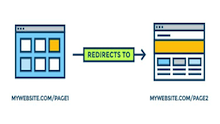
If you change the name or location of pages on your website, a 301 redirect allows you to seamlessly guide visitors and search engine crawlers to your updated pages while preserving your search engine ranking. For instance, you can send users from oldpage.php (.asp or .jsp) to “http://www.newdomain.com/newpage.html” while maintaining your SEO ranking and backlinks. Utilize the code provided below…

The WordPress editor offers a variety of layout element blocks, such as Buttons and Spacers, that can enhance the visual appeal of your pages and posts. You can locate them in the Layout Elements section of the Add block menu. Now, let’s explore the process of adding a generic block in WordPress. 1. Add an Image Block in WordPress To…